
Why Digital Card Games Still Feel Familiar as Technology Changes
Move a game from a felt table to a buzzing arcade cabinet. Everything changes.
Move it again to a desktop computer. Things change even more. You lose the heavy buttons and gain a mouse.
But developers rarely throw out the visual language you already know.
A king still looks like a king. A heart is still red. Cards still resemble physical cards even though there may be no physical cards anywhere in the system.
Good digital game design often changes the interface without destroying familiarity. The hardware can completely vanish, but the visual cues stick around.
Cards Already Had an Interface Before Computers
Long before anyone got paid a salary to be a UX designer, playing cards were already doing the heavy lifting.
They basically functioned as a perfect visual interface. You have suits. Ranks. Colors. Orientation. You can fan five cards in your hand and instantly know your odds.
The symbols are instantly recognizable. The spatial arrangement just works.
You process the math without reading a single paragraph of instruction text. That built-in visual vocabulary made playing cards incredibly easy to translate to early screens. Developers didn’t have to invent a new way to communicate value. The players already knew the rules before they even dropped a coin in the slot.
Electronic Machines Added a New Layer: Controls
The second these games hit electronic cabinets, developers hit a massive wall.
Players couldn’t actually touch the cards anymore.
That physical connection was severed completely. They had to interact through physical buttons, stare at a curved piece of glass, and wait for the machine to spit back visual feedback.
The experience split into pieces. Player action triggered a physical control. The software processed that mechanical click. Then the screen provided the feedback. Every single button on the dashboard needed an absolute, obvious function. Hold. Discard. Bet.
BolaTangkas offers a useful example of this transition. The familiar visual language of playing cards could remain recognizable even when the cards themselves became images displayed by an electronic system. The machine handled the dealing, but the player’s brain still read the exact same poker hands.
The Mouse Changed the Interface Without Changing the Game
Then PCs showed up and blew the arcade model apart.
Physical arcade buttons vanished. Graphical buttons replaced them on the screen. You didn’t punch a heavy wooden cabinet anymore. You dragged a plastic pointer across a mousepad.
It sounds like a minor detail. It wasn’t. The interface shift was massive.
We got cursors. Clickable areas. Drop-down menus. We got hover states where a digital button subtly glowed just because your mouse rested over it.
But the visual metaphors stuck around stubbornly. Digital buttons were actively drawn with fake shadows and bevels. Developers wanted them to look exactly like the heavy plastic arcade switches people were used to hitting.
Familiarity Is a Feature
Why not just redesign everything from scratch whenever new tech drops?
Because learning new rules is exhausting. People hate reading manuals. Familiarity kills learning friction instantly.
Recognition beats recall every single time. It is way easier to spot a red diamond on a screen than to memorize a brand-new digital ruleset. Visual consistency keeps people grounded. They know the exact game state just by glancing at the monitor.
Immediate feedback is just as vital to the experience. You click your mouse, something flips over on the screen.
And visual hierarchy ensures the actual cards stay front and center. The boring stuff—like volume settings or account menus—gets shoved to the dark corners of the screen.
Tangkasnet Fits Into This Transition Too
When things eventually moved online, the interface suddenly had to handle a lot more than just cards and buttons.
The interface now had to manage navigation. User identity. Live connectivity. The evolution of Tangkasnet can also be viewed through this design problem: how do you carry a recognizable game identity into a computing environment that is very different from the machines associated with earlier electronic gaming?
You had to wrap a classic arcade experience in a totally new web shell. And you had to do it without confusing the players who just wanted to see their cards.
Touchscreens Removed the Pointer
Then smartphones arrived and killed the mouse pointer entirely.
A mouse is a surgical precision tool. A human finger is absolutely not.
There is no hover state on a piece of glass. You can’t right-click on a touchscreen. And your own hand literally blocks the screen you’re trying to read while you play.
So the UI had to mutate violently.
Touch targets got massive. Spacing expanded so people stopped fat-fingering the wrong options. Developers aggressively stripped out simultaneous controls because mobile screens were just too small.
If you look at how card games adapted to smartphones, you see interfaces that threw out the dense PC layouts completely. They stripped everything down to raw, tap-friendly grids.
Why Modern Interfaces Often Look Simpler
Open a modern digital card app today. It looks incredibly bare compared to software from twenty years ago.
The fake wood textures are gone. The fake 3D buttons are flat.
But visually simpler doesn’t mean the software running underneath is basic. It’s usually the exact opposite. Modern design just hides the clutter aggressively.
Controls are completely contextual now. They only appear when you actually need to tap them. The layout responds instantly to your specific screen size.
Complexity increasingly moved behind the interface rather than disappearing from the system. The math got harder so the screen could look cleaner.
The Screen Changes. The Visual Language Survives.
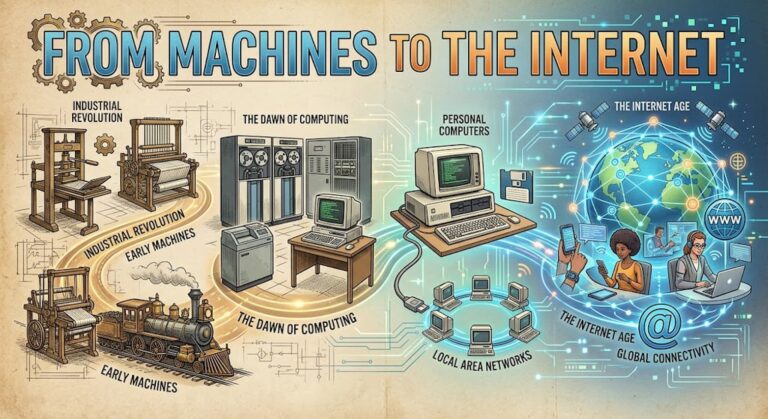
Physical cards. Electronic displays. Computer screens. Web browsers. Touchscreens.
The physical medium morphed over and over again across decades.
But the suits, the ranks, the familiar controls, and the instant visual feedback kept the continuity alive.
That is why a game format can survive multiple generations of dead hardware without fully retraining its players. The machine dies, but the visual language survives completely intact.